Newark Airport EWR
- 4.5
- Rating
- 10.00K
- Installs
- Free
- Price

 Analysis by App-foxy
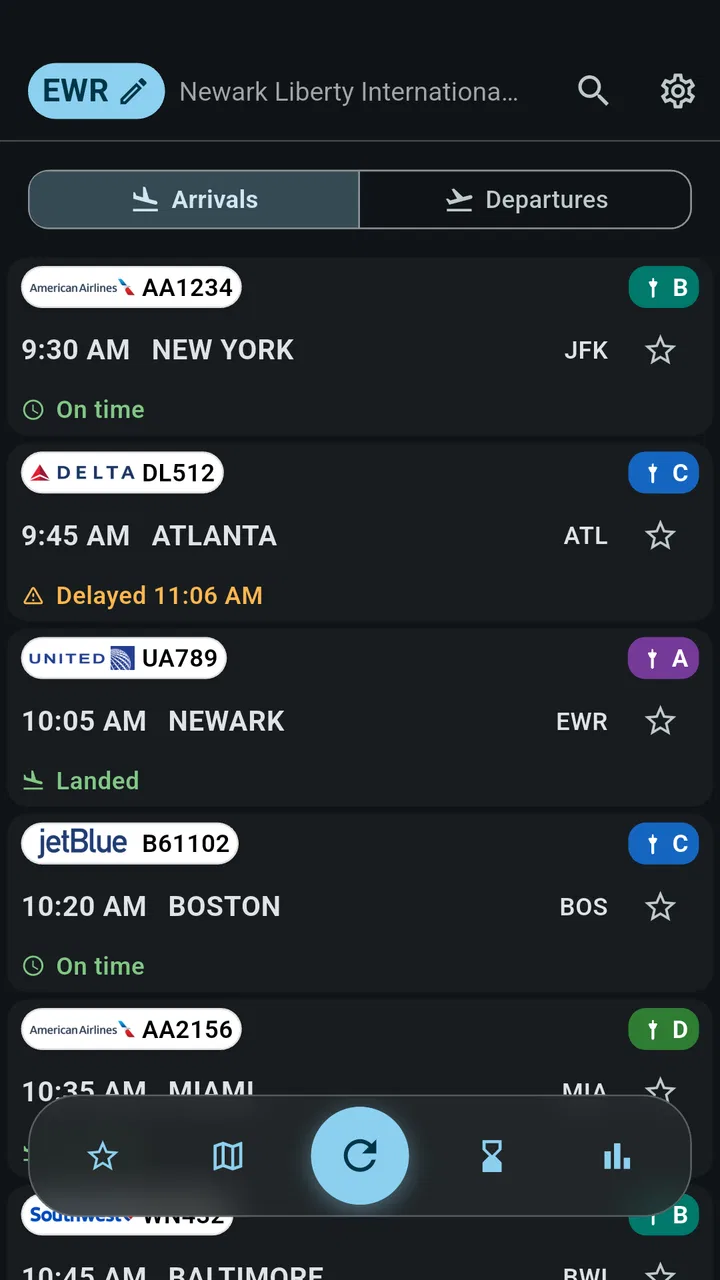
When I travel through Newark, the most useful information is rarely the airport’s general address or a broad travel guide. What I need is much narrower: whether my flight is still on time, where it is expected to leave, and whether the situation has changed while I am on the way. Newark Airport EWR is built around that single, practical need. It is a free Travel & Local app from FlightInfoApps.com that focuses on live arrivals, departures, gates, and delays for Newark Airport.
I see its value less as a complete trip planner and more as a compact airport-monitoring tool. That distinction matters. If you want hotel ideas, train tickets, sightseeing suggestions, or a full itinerary manager, this is not trying to replace those services. If you are flying through EWR and want a quick way to check the operational status of your flight, its focused approach is much easier to understand and use.
The app has been available since November 7, 2013, and its current version is 26.8.23. It has a 4.5 average from 141 ratings and more than 10K installs, which gives it a modest but encouraging track record. I would not treat those figures as proof that every update or every flight display will be perfect, but they do suggest that the app has found a clear audience among Newark travelers.
You May Also Like

 AccuWeather: Weather Radar
AccuWeather Review: A Quick, Clear Forecast for Everyday Decisions
For everyday plans, the best forecast is the one you can understand quickly. AccuWeather makes rain timing, radar, and local conditions easy to act on, with a few trade-offs.

 Hill Climb Racing
Why Hill Climb Racing Still Turns Crashes Into One More Run
A tiny car, a bumpy hill and one more upgrade: Hill Climb Racing keeps resurfacing because its simple chaos makes every near-miss feel personal.

 AliExpress - Shopping App
AliExpress Makes Global Shopping Feel Personal, but Shoppers Bear the Risk
AliExpress turns a global marketplace into a pocket-sized discovery engine. Its reach is useful, its shopping loop compelling, and its trade-offs easy to miss.

 Lords Mobile: Kingdom Wars
Lords Mobile Is a Kingdom-Building Routine, Not a Quick Match
A case-by-case verdict on the building, battles, device demands, and social commitments that make Lords Mobile rewarding for some players and exhausting for others.

 PDF Scanner app - TapScanner
TapScanner Makes Paperwork Easier to Capture, Check, and Share
TapScanner makes scanning with a phone feel less like a rescue operation and more like a dependable step in getting work done. Its capture tools are useful, though not flawless.

 Block Blast!
Block Blast! Shows How Much a Puzzle Game Can Leave Out
A quiet grid game shows why puzzle players increasingly value instant clarity, repeatable skill and low-pressure play—and where the genre still needs to catch up.
More From Our News Desk
View All News


Why live Newark flight information is the real feature
I find that the key question with Newark Airport EWR is not simply whether I can get online, but whether I can check the flight at the moments when a change would affect my plans. This section looks at how live status fits into that decision-making, then turns to the practical realities of checking it while traveling and making sensible backup choices.
A narrow purpose that makes sense at a busy airport
The central capability here is live flight information for EWR. In everyday use, that means checking arrivals and departures without opening a much larger airline or travel platform. The practical effect is that I can make a decision based on the airport situation rather than relying only on the schedule I saw when I booked the ticket.
That difference becomes important when a flight changes after I have already left home. A scheduled departure time is useful for planning, but it is not the same as the current airport status. A delay can affect when I leave, whether I have time to eat before security, or whether someone collecting me from the airport should wait at the terminal. The app’s emphasis on live status is therefore more useful than a static timetable.
Gate information adds another layer of usefulness. A flight can remain on time while the gate changes, and that kind of update can be more relevant than the original schedule. When I am already inside the airport, knowing the current gate helps me decide whether I can stop for coffee, use a restroom, or simply head toward the correct area instead of walking in the wrong direction.
Arrivals make the app useful for people who are not flying themselves. If I am picking up a friend or family member, I can check the incoming flight rather than repeatedly asking the traveler to send updates. That is a small convenience, but it removes unnecessary messages at exactly the time when the traveler may be dealing with boarding, baggage, or a weak connection.
What the focused design does not try to solve
I think the app works best when I treat it as an airport-status reference, not as a universal travel assistant. It does not become more useful simply because it covers every possible travel topic. Its advantage is that the question is simple: what is happening with this Newark flight right now?
For airline-specific requests, the airline’s own app may still be the better choice. The airline is usually the place to manage a reservation, select a seat, change a ticket, view loyalty details, or receive messages tied to an account. Newark Airport EWR is more attractive when I want an airport-centered view, especially if I am tracking a flight without wanting to manage the booking itself.
The same applies to navigation. A maps app is better for driving directions, parking routes, or estimating the trip from home to the airport. The Newark app becomes relevant once the question shifts from “How do I get there?” to “What is happening with the flight at EWR?” Keeping those roles separate prevents disappointment and makes the tool easier to judge fairly.
How I would use it before leaving home
My preferred workflow is to check the flight before starting the journey, then check it again closer to departure. The first check tells me whether the day is broadly on schedule. The second helps me avoid treating an earlier status as permanent. I would also confirm the information against the airline when the flight is especially important, because no single airport-status screen should be the only basis for a costly decision.
For a departure, I would use the app to look at the current time and gate information, then allow plenty of room for the parts it does not control: traffic, parking, terminal access, security queues, and walking distance. A displayed gate is not a guarantee that reaching that gate will be quick. The app can inform the airport decision, but it cannot remove the airport’s physical delays.
For an arrival, I would check the inbound flight before leaving to collect someone. That is more efficient than setting off according to the original timetable and discovering later that the aircraft is delayed. I would still avoid assuming that the arrival time equals the moment the passenger reaches the pickup area. Baggage, immigration, and the walk out of the terminal can all take additional time.
The best everyday scenario: coordinating a pickup
The strongest real-world use case, in my view, is meeting someone at Newark without wasting time circling or waiting unnecessarily. Imagine a family member flying in while I am several miles away. Before driving, I open the app and check the arrival status. If the flight is delayed, I can postpone leaving instead of sitting at the airport. If the flight is progressing normally, I can start planning around the expected arrival while remembering that the passenger still needs time to exit.
Once I am near the airport, the gate information can help me understand where the traveler is likely to emerge, but I would not use it as a substitute for agreeing on a pickup location. Airports can have complicated traffic patterns, and a gate is not always the same thing as a convenient curbside meeting point. The useful habit is to combine the app’s flight information with a clear message about where to meet.
This scenario shows the app’s real effect: it improves timing and reduces guesswork. It does not make the airport simple, but it gives me a current reference before I commit to a drive or ask another person to wait.
A second useful scenario: checking a departure while already traveling
Another good use is checking a departure while I am on the way to EWR. A traveler may have planned the trip around the original schedule, then notice traffic or another delay. The app can help answer whether the flight itself has changed, which is useful context when deciding how urgently to continue. I would never interpret a delay as permission to arrive late, but I may use it to understand the situation and make a calmer decision.
There is a subtle trade-off here. A delay can be revised, shortened, or followed by a quick gate change. That means I would not check once and put the phone away for the whole journey. The more important the flight, the more sensible it is to treat the app as a snapshot that needs occasional rechecking rather than a permanent promise.
Practical habits that make the app more useful
First, I would search or select the flight carefully rather than assuming that a similar flight entry is the right one. Newark handles many movements, and a small mistake in the flight details can make an accurate status look irrelevant. This is an easy point to overlook when checking quickly.
Second, I would look at both the time and the gate instead of focusing only on whether the flight says “on time.” “On time” answers one question, but the gate can affect how I use the remaining time. A gate change may require a different walking plan even when the schedule has not moved.
Third, I would use the app as part of a two-source routine for important travel. The airport-focused view is convenient, while the airline remains the sensible place to check booking-specific instructions. This is not unnecessary duplication: the two services answer different questions, and comparing them can reveal when a general airport status needs closer confirmation.
Finally, I would avoid making a pickup promise based only on the listed landing time. The app is most helpful when it starts the coordination process, not when it is treated as a precise prediction of the moment a passenger will be standing outside.
Where the experience may feel limited
The focused design can also feel restrictive. Travelers who want one app for reservations, boarding passes, airport maps, baggage rules, and destination planning may find this too specialized. I prefer a specialized tool when I need a quick status check, but I would not want it to be my only travel app.
Live information also creates an expectation of constant certainty. In reality, airport operations change quickly. A gate may move after I look at it, and a delay can be updated later. The app’s value is not that it eliminates uncertainty; it gives me a current point of reference so I can respond to uncertainty more intelligently.
There is also a possible cost consideration. The app is free to install, but in-app purchases range from $3.49 to $32.99 per item. That makes it important to pay attention to any purchase prompt and decide whether the extra value fits the way I travel. Someone who checks Newark flights occasionally may be satisfied with the basic free experience, while a frequent traveler may judge optional paid elements differently.
The Mature 17+ content rating is another detail parents and younger users should notice before installing. It does not change the app’s airport purpose, but it does mean I would not assume that it is intended for every age group simply because it is a travel utility.
How it compares with the usual alternatives
The most obvious alternative is the official airline app. That option is stronger when I need to manage a booking or receive account-linked travel information. Newark Airport EWR is more convenient for a quick airport-level check, particularly when I am tracking an arrival for someone else or do not want to navigate through reservation screens.
A second alternative is a general flight-tracking service. Those tools can be better for people who follow flights across many airports, compare routes, or want a broader aviation overview. The Newark app’s benefit is concentration: if EWR is the airport I care about, I do not have to turn a broad tracking platform into a Newark-specific tool every time.
The airport’s own website can also be useful, especially when I need broader terminal information or official airport guidance. A website may offer more context, while an app can be quicker to open for a repeated status check. Which one is better depends on whether I need a single flight update or a wider airport reference.
For a traveler who rarely flies through Newark, the airline app and a browser may be enough. For someone who regularly departs from or collects people at EWR, the dedicated focus becomes more worthwhile. This is a case where specialization is the main reason to choose it, not a claim that it replaces every other travel service.
Who will get the most from it
I would recommend it most to Newark-focused travelers who want a simple way to check departures, arrivals, gates, and delays in one place. It is particularly sensible for people who frequently pick up relatives, monitor a colleague’s arrival, or travel through EWR often enough that opening a dedicated airport tool feels faster than searching from scratch.
It can also help occasional travelers who dislike cluttered travel apps. The free price makes trying it low-risk, although I would still review any optional purchases before confirming them. The current version and long availability suggest an established utility rather than a brand-new experiment, while the rating gives some reassurance that the basic idea works for many users.
I would skip it if Newark is only a rare stop and I already have an airline app that covers every question I ask. I would also choose something broader if I need multi-airport tracking, detailed journey planning, or reservation management. The app is at its best when the airport itself is the center of the question.
My final view after using it as a travel companion
The best reason to install Newark Airport EWR is its focused live-status workflow. It turns a vague travel worry into a few concrete checks: has the flight changed, where is it expected to go, and should I adjust my timing? That is genuinely useful before leaving home and while coordinating an airport pickup.
I also think its limits are easy to understand. It is not a replacement for the airline when a booking needs attention, not a navigation tool for the drive to the terminal, and not a guarantee that airport conditions will remain unchanged. Used with those boundaries in mind, it avoids overpromising and does its specific job well.
For me, the deciding question would be how often Newark appears in my travel plans. If EWR is a regular airport in my life, the dedicated information is convenient enough to earn a place on my phone. If I only pass through occasionally, the airline’s tools or a general flight tracker may be sufficient. Either way, Newark Airport EWR makes the most sense as a practical companion for people who need current Newark flight information without the distraction of a much larger travel platform.
FAQs for Newark Airport EWR
01What is Newark Airport EWR and what can I use the app for?
Newark Airport EWR is designed to help travelers manage their journey through Newark Liberty International Airport. It can provide useful airport information such as terminal details, flight updates, transportation options, parking guidance, amenities, and maps. After reviewing the available information, I found it most helpful for checking practical details before leaving home and while navigating the airport.
02Does Newark Airport EWR provide live flight status and gate information?
The app may provide flight-related information, including departure and arrival status, scheduled times, terminal details, and gate information when those details are available. However, airport information can change quickly because of delays, operational decisions, weather, or airline updates. For important travel plans, I recommend comparing the app’s information with your airline’s official notifications and airport announcements.
03Can Newark Airport EWR help me find terminals, gates, parking, and transportation?
Yes, one of the app’s most useful purposes is helping travelers understand the airport layout and available ways to reach or leave Newark Liberty International Airport. Depending on the information provided in the current version, you may find terminal maps, parking guidance, rental car details, taxis, rideshare instructions, public transportation, and airport shuttle information. Always check current signs and staff directions on arrival.
04Does Newark Airport EWR work without an internet connection?
Some basic information may remain accessible after it has loaded, but features such as live flight updates, current gate changes, transportation notices, and refreshed airport services generally require an internet connection. I would not rely on offline access for time-sensitive travel information. Before heading to the airport, open the app while connected to Wi-Fi or mobile data and save any essential details you may need.
05Is Newark Airport EWR free to download, and what permissions does it require?
The app’s download cost and available features can depend on the Android or iOS version listed in the relevant app store. Some airport apps are free, although mobile data or optional third-party services may create separate costs. Before installing, review the store listing, privacy policy, developer information, and requested permissions. Location access may be useful for navigation, but you should only grant permissions you are comfortable using.
Pros
- Provides real-time flight status and gate information for EWR travelers.
- Airport maps make it easier to locate terminals
- gates
- and facilities.
- Useful details about parking
- ground transportation
- and airport services.
- Can help users plan arrivals
- departures
- and connections more efficiently.
- Convenient access to Newark Liberty airport information in one place.
Cons
- Some information may change quickly during delays or airport disruptions.
- The interface can feel less useful when browsing without a specific flight.
- Coverage is focused on Newark and offers limited value at other airports.
- Map and location features may require an active internet connection.
- Flight details may occasionally depend on updates from external sources.

Newark Airport EWR
Gallery